Any file type
Scanned records, PDFs, Office files and email, read as they came
Brennick reads PDFs, scans, Office files, email, archives and phone photos, keeps every original exactly as it was uploaded, and stores audio and video for your attorney without sending them to any model.
- This page01AI draftcited to pages
- 02Attorney reviewedit, approve or reject
- 03Approvedexport, demand, report
- 04Clientnever sees AI output
Who this is for
Intake coordinators and paralegals who receive files however clients and providers send them, at personal injury and employment firms. The medical records requests guide covers asking providers for electronic copies, and every file type is read on every plan (pricing).
Every file ends up one of three ways
Read
Documents, scans, email, archives, web pages and photos. Turned into a reading copy, cleaned, then read page by page.
Stored for review
Audio and video. Kept as uploaded and playable for your staff. Never read, never transcribed, never sent to any model.
Stored, not readable
Medical imaging (DICOM) and files Brennick does not recognize. Kept as uploaded and marked not readable, with the reason.
What Brennick reads
PDFs and scans
The text layer is read where a PDF has one. Scanned pages are read with OCR.
Word, Excel and PowerPoint
.docx, .doc, .xlsx, .xls, .pptx and .ppt, the OpenDocument formats, Apple Pages, Numbers and Keynote (when they convert), RTF, CSV and plain text. Macros and embedded objects are never opened.
Email
.eml and Outlook .msg. The message is read, and each attachment becomes its own document, linked to the email.
ZIP archives
Each file inside becomes its own document, up to 200 files and 500 MB per archive. An archive inside an archive is unpacked; one more level is not.
Photos and images
JPEG, PNG, HEIC from iPhones, TIFF (multi-page faxes included), GIF, WebP, BMP and AVIF, each turned into a page and read.
Web pages and message exports
HTML is read as text: its scripts are dropped and the page is never rendered. Text exports of phone messages are read too.
Documents up to 100 MB each. One upload can carry up to 150 MB of documents and 4 GB of recordings.
The original, kept byte for byte
Every upload is stored exactly as it arrived, with a SHA-256 fingerprint taken at upload. Brennick reads from a separate reading copy, so the original is never altered.
Your staff can download either copy. The original comes with a warning, because it may still carry metadata or active content, and the download is written to the audit log.
Cleaned before any model sees it
Files other than PDF, JPEG and PNG are turned into a reading PDF by a separate converter that runs apart from the app, with no internet access. Every reading PDF is then cleaned: document scripts, automatic actions, attachments, annotations, form fields and hidden metadata are removed. Photos and images are rebuilt from their pixels, which leaves their camera and location data behind.
Text printed on a page cannot be removed without changing the record. So the instructions Brennick gives the model treat everything inside a document as evidence, never as instructions.
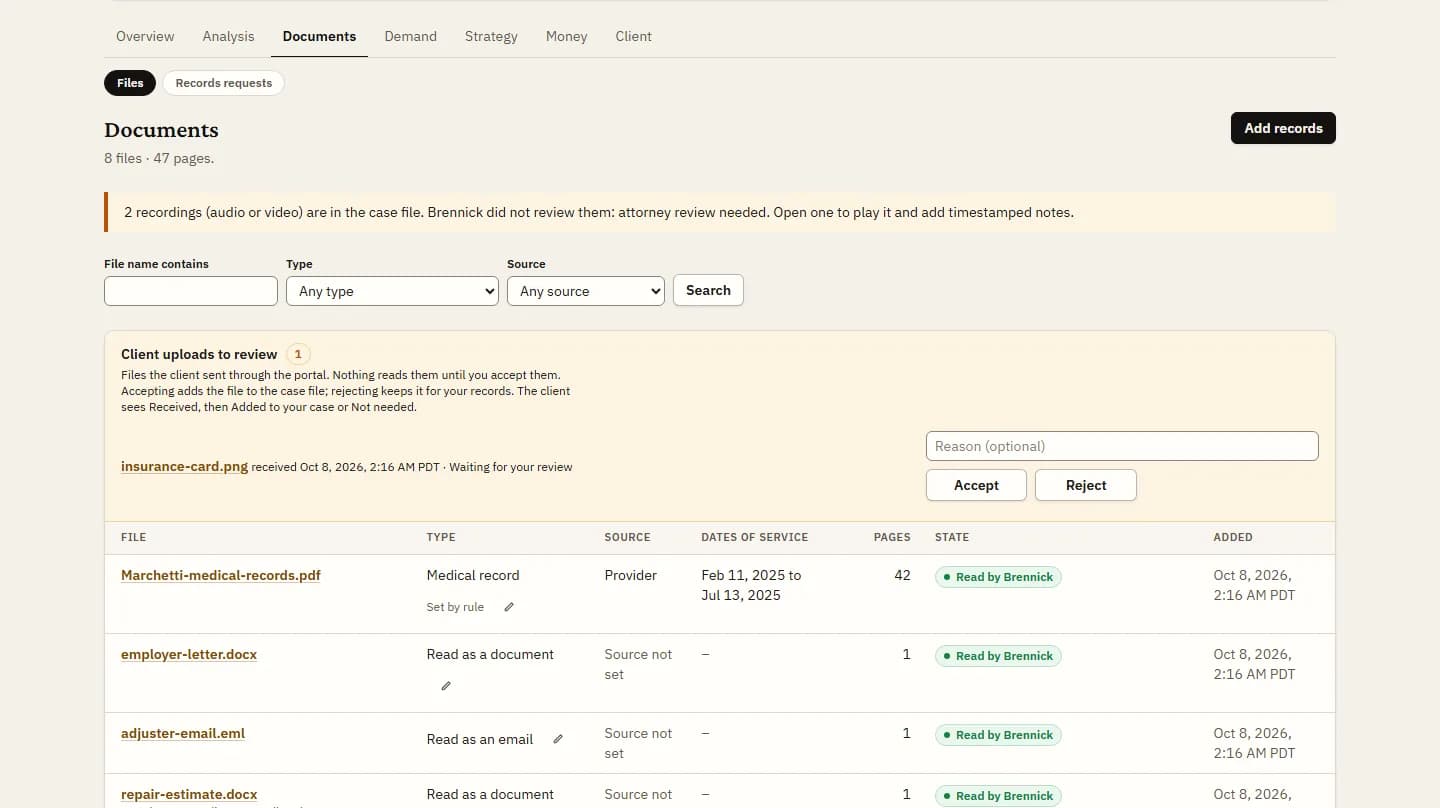
Files a client sends through the portal wait as “Received” until your staff accept them. Nothing reads them before that.
Audio and video
Recordings are stored as uploaded, up to 2 GB each, and play on the document’s page where the browser supports the format. They are never read, never transcribed and never sent to any model.
The case’s evidence inventory marks each one “Audio/video. Not reviewed by Brennick. Attorney review needed.” Your staff can write notes at a point in the recording, and a note can become a timeline event marked “Added by staff”.
Programs, and files Brennick cannot read
Programs and scripts (.exe, .bat, .js and similar) are refused. They are checked by their content as well as their name, so a renamed program is refused too.
Medical imaging files (DICOM) and files Brennick does not recognize are stored as uploaded and marked as not readable, with the reason. For imaging, the radiologist’s report is what gets read.
FAQs
Can clients send photos from their phone?
Yes. Through your intake page or the client portal, phone photos, HEIC included, are read like any other page.
What happens to an email’s attachments?
Each attachment becomes its own document, linked to the email, and is read on its own. The email’s date, sender and recipients go into the timeline marked “From the email header”.
Why are recordings not transcribed?
By design. A recording is evidence your attorney should hear. Brennick stores it, plays it and marks it as not reviewed, and your staff can note what is said at each point.
What is the largest file I can upload?
Documents up to 100 MB each and recordings up to 2 GB each.
Upload the file as you have it
3-day trial, 1 case, card required. Drop in the email, the ZIP and the phone photos together.